Agency-Styled AI Powered
Digital Marketing Mastery Course
Master Digital Marketing & Generative AI – From Basics to Pro with Real-World Agency Projects
Are you ready to master the art and science of digital marketing while leveraging the power of Generative AI?
Introducing “Agency-Styled AI-Powered Digital Marketing Mastery” – a Live Interactive Online Course specially designed for students, job seekers, professionals, freelancers, and entrepreneurs who want to gain practical, real-world marketing skills used by top digital marketing agencies.
What makes this course unique?
- Real Agency-Style Projects to simulate client-based learning
- Assignments, Quizzes & Case Studies to test your understanding
- Practical Implementation Sessions (Not just theory)
- Real-time Projects & Campaign Building
- Templates, Checklists & AI Prompts
- AI Tools Integration across every marketing domain
- Live Mentorship & Career Guidance from industry experts
- Lifetime Access to Recorded Sessions + eNotes
- Community Access & Monthly Q&A Support Sessions
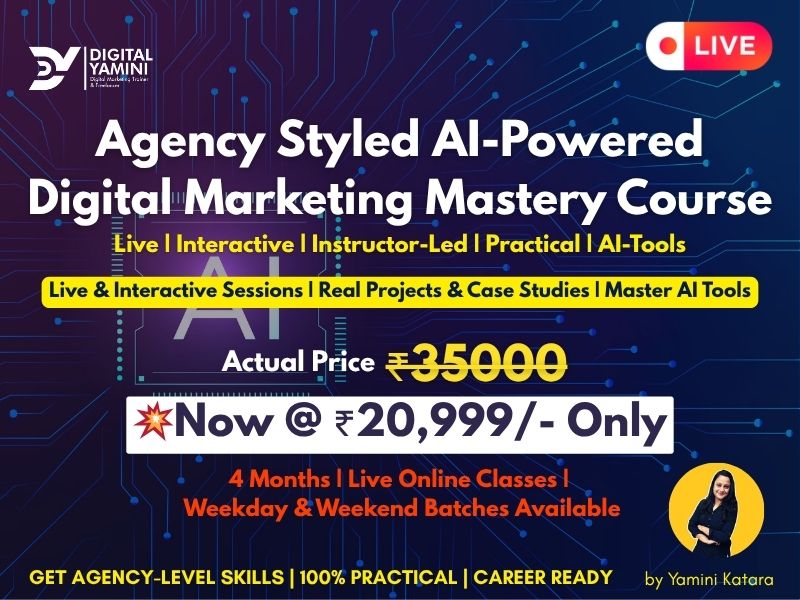
₹ 35000/- Now @ ₹ 20999/-
New Batch Starting Soon. HURRY UP!
Course Duration 4 Months | Live Online Classes | Weekdays & Weekend Batches
| Lesson 1: What is Digital Marketing? |
| Lesson 2: Scope of Digital Marketing |
| Lesson 3: Traditional Vs Digital Marketing |
| Lesson 4: Benefits of Digital Marketing |
| Lesson 5: Digital Marketing Channels |
| Lesson 6: Career Opportunities in Digital Marketing |
| Lesson 7: Leveraging Gen AI in Digital Marketing & Trends |
| Lesson 1: Introduction to Graphics Design |
| Lesson 2: Color Psychology + Fonts |
| Lesson 3: Canva Tutorial ( Dashboard Overview + Practical Implementation) |
| Lesson 4: Video Editing: clipchamp or kapwing |
| Lesson 5: AI Tools to Generate Images & Videos |
| Lesson 1: Content Marketing Introduction & Types of Content & Benefits |
| Lesson 2: Content Marketing Cycle & Stages | |
| Lesson 3: Content Calendar & Lead Magnets | Content Marketing Tools |
Lesson 4: Content Funnel_Buyers’ Journey Stages | TOFU, MOFU, BOFU Explain with the example |
| Lesson 5: How to Build a Successful Buyer Persona in Minutes |
| Lesson 6: Copywriting: AIDA Model | Explain with the help of example |
| Lesson 1: Introduction to Domain & Hosting & Other Technical Terms |
| Lesson 2: Project Decide ( Niche/ category) | How to find the best domain |
| Lesson 3: How to purchase Domain & Hosting |
| Lesson 4: How to connect Domain & Hosting and Install WordPress |
Lesson 5: Overview of cPanel | How to create Business Email Id & access it |
| Lesson 6: WordPress Dashboard Overview & General Settings | Permalinks |
Lesson 7: Understanding Website Design (Layout & Structure | Website WireFrame) |
| Lesson 8: Install Theme & Use Template Plugins to create a website |
| Lesson 9: Create Pages + Menu (Create Multiple Menus) |
| Lesson 10: Header Builder + Top Bar (Customize Feature) |
| Lesson 11: Page Builder: Elementor Overview_Class 1 |
Lesson 12: Page Builder: Elementor Overview_Class 2 (Elementor Addons & Premium Addons) |
Lesson 13: Recommended Plugins (Templately, Starter Template, Smart Slider 3, Updraft Plus, etc) |
| Lesson 14: Create Home, About, Contact us, Services, Blog Page |
| Lesson 15: Customize Website + Footer |
Lesson 16: Practical Implementation of Plugins | Sliders, Forms, Pop ups, Backup of the website |
| Lesson 17: Overall website check and make it responsive |
| Lesson 1: Important Plugins for E-Commerce Website |
Lesson 2: Create Required Pages: Cart, Checkout, My Account, T& C, Refund & Return Policy, Privacy Policy, etc. |
| Lesson 3: Woocommerce settings_Part 1 (Set up Tax, shipping details) |
Lesson 4: Woocommerce settings_Part 2 (Payment Gateway and other settings) |
| Lesson 5: Create Product Categories & sub categories |
| Lesson 6: How to upload a simple product.(step by step process) |
| Lesson 7: How to upload product variations and make store Live |
| Lesson 8: Discount Coupons and apply discount on checkout page |
| Lesson 9: Customize Categories & product pages (Filters/ sidebars) |
Lesson 10: Set up Home Page as an eCommerce store Page | Products Categories/ carousal on Home Page |
Lesson 1: Introduction to Landing Pages | Importance & Types of Landing Pages |
| What is a Landing Page? Purpose of Landing Pages |
| Difference Between a Landing Page & Website Homepage |
| Importance of Landing Pages in Digital Marketing |
Types of Landing Pages (Lead Generation, Click-Through, Sales, etc.) with examples |
| Lesson 2: Core Elements of a High-Converting Landing Page |
| Headline & Subheadline Best Practices |
| Compelling Call-to-Action (CTA) |
| Lead Capture Forms: Design & Placement |
| Social Proof & Trust Signals (Testimonials, Reviews, Trust Badges) |
| Engaging Visuals & Multimedia (Images, Videos, Animations) |
| Clear unique selling proposition (USP) |
| Engaging Hero shot |
| Lesson 3: Landing Page Builders & Tools | Landing Page Copywriting |
Introduction to Landing Page Builders (Unbounce, Instapage, Leadpages, ClickFunnels, WordPress) |
| Landing Page Copywriting |
| Lesson 4: Create a Landing Page using WordPress |
| Using Pre built template and Elementor Plugin_ Part 1 |
| Using Pre built template and Elementor Plugin_ Part 2 |
| Lesson 5: Landing Page CRO + Optimization Checklist |
| Checklist for Landing CRO |
| Landing Page Optimization checklist |
Lesson 1: SEO Basics: What is SEO and How Does it Work? | Types of SEO | Search Engine Optimization Full Information |
Lesson 2: How Search Engine Works? Crawling, Indexing, and Ranking – Complete Explanation | SERP Explaination |
| Lesson 3: Top 5 Google Algorithms Related To SEO | Panda, Penguin, Hummingbird, RankBrain, EEAT |
| Lesson 4: Keyword Introduction: Types of Keywords, keyword Terminology |
Lesson 5: Keyword Research ( Google Keyword Planner + Semrush ) Practical- Keyword Research Template |
| Lesson 6: Keyword Research ( Ubersuggest & Other Methods) Practical |
Lesson 7: On-Page SEO (Keyword Placement in Content), Keyword Density, Keyword Proximity. K Prominence |
Lesson 8: On Page – Image Alt Tag, Device Responsive, Header Tags, Internal Link & External Link |
Lesson 9: On Page SEO – Title , Meta Description , URL, Focus Keyphrase (using SEO Plugin) |
| Lesson 10: On Page SEO Checklist & Analysis (Audit) |
| Lesson 11: Schema Markup (Data Structure) & Sitelinks |
Lesson 12: Technical SEO Introduction and checklist | Connect GSC to Website |
| Lesson 13: Generate Sitemap and Submit it in GSC |
| Lesson 14: Generate Robots.txt file |
| Lesson 15: Check Page Speed & Optimize page speed (Factors include) |
Lesson 16: Canonical Tags and Redirection (301 vs. 302 Redirects for SEO), 404 Error |
| Lesson 17: Open Graph, Twitter Cards, other remaining things |
Lesson 18: Off Page SEO: Backlinks Overview | Importance of Backlinks for SEO |
| Lesson 19: Understanding DA & PA | How to check DA and PA Score |
| Lesson 20: Do Follow & No Follow Backlinks |
| Lesson 21: How to build Backlinks: Methods |
| Lesson 22: Backlinks using Guest Posting |
| Lesson 23: Backlinks using Article Directory Submission |
| Lesson 24: Link Building – Q&A Sites |
| Lesson 25: Link Building – Image Submission |
| Lesson 26: Link Building : Social Bookmarking Links & Directory Submission |
| Lesson 27: Link Building : Infographics & PDF Submission |
| Lesson 28: Local SEO: Google My Business Overview and Account set up |
| Lesson 29: Optimizing GMB Account |
| Lesson 30: SEO Audit using SemRush & Screaming Frog |
| Lesson 31: eCommerce SEO |
| Lesson 32: Difference Between SEO, AIO, AEO, and GEO |
Lesson 1: What is Google Search Console? | How to Add a Website to Google Search Console? |
| Lesson 2: Overview & Performance Report in Search Console |
| Lesson 3: URL Inspection (Indexing) – Fetch as Google |
Lesson 4: Find and Fix Index Coverage Errors in Google Search Console | Complete Guide |
| Lesson 5: Core Web Vitals & Page Speed Insights |
Lesson 6: Backlink Report | How to Check Backlinks in Google Search Console |
| Lesson 7: Links, Manual Actions & Security Issues & Other Settings |
Lesson 1: Overview of Google Analytics 4 (GA4) | Google Analytics Terminology – Google Analytics Terms You Need To Know |
| Lesson 2: Setting Up a GA4 Account (with website) and Add Property |
| Lesson 3: Set Up Google Analytics with Google Tag Manager |
Lesson 4: Set up Google Analytics Demo Account for Free & Exploare Dashboard & Reports |
Lesson 5: Dashboard Overview: Walkthrough of GA 4 Dashboard | Exploring Basic Reports | How to Build Google Analytics Dashboard – Explained |
| Lesson 6: What are Real Time Analytics Reports | Realtime Reports in GA4 |
| Lesson 7: How to Set Up Events in Google Analytics – Complete Tutorial |
Lesson 8: Create Custom Events in GA4 using Google Tag Manager Step by Step |
Lesson 9: How to check Reports: Acquisition, Engagement rate (Bounce Rate replaced by Engagement sessions) |
Lesson 10: Check Retention Report in Google Analytics 4 | Users Report in Google Analytics 4 |
Lesson 11: Connect Google Ads & GSC with GA4 & Other Important Features in Admin Panel |
| Lesson 12: Create Customized Basic Report in GA 4 |
| Lesson 13: How to make customized Reports using Free Forms |
| Lesson 14: Create Landing Page Report in GA 4 |
| Lesson 15: Funnel Exploration in Google Analytics |
| Lesson 16: Concept of Filters in GA4 & How to use them |
| Lesson 17: What is cohort Analysis & Exploration, debug view in GA4 |
Lesson 18: How to give access in Google Analytics 4 at Account & Property Level |
Lesson 19: The Concept of Audience Categories in Google Analytics | Google Analytics Tutorial |
Lesson1: Social Media Optimization & SMM Overview, Social Media Platforms |
| Lesson 2: Instagram Professional Account set up & Optimization Tips |
Lesson 3: Put content on Instagram account (Reels, Carousals, Stories)& view Insights of the account & content |
| Lesson 4: Instagram Ads using boost feature |
| Lesson 5: Create Facebook Page & Optimize it |
| Lesson 6: How to Create an Event & Group using FB Page |
| Lesson 7: Introduction to Meta Business Suite | Dashboard Overview |
Lesson 8: Create Business Portfolio & Settings (Add Facebook Page, Ads account, Assets & People) |
| Lesson 9: Content Planner: Meta Business Suite |
| Lesson 10: Automated Messages Set up in Meta Business Suite |
| Lesson 11: Events Manager: Meta Pixel Integration |
| Lesson 12: Set up Manual Events & Custom Conversions in Events Manager |
| Lesson 13: How to create Audiences: Saved, Custom, and Look alike |
| Lesson 14: Introduction to Facebok Advert Manager Account |
Lesson 15: Explain Facebook Campaign Objectives | Facebook Ads Launch Checklist |
| Lesson 16: Create a Facebook Awareness & Reach Ads |
| Lesson 17: Create a Facebook Ads Website Traffic Ads |
| Lesson 18: Create a Facebook Lead Generation Ads |
| Lesson 19: Create an Engagement campaign + Store Location |
| Lesson 20: Setting up Commerce Manager for catalogue Ads |
| Lesson 21: Create a Sales/ Catalogue Ads |
| Lesson 22: Facebook Remarketing Ads |
| Lesson 23: Ads Reporting and KPIs to measure |
| Lesson 24: Introduction to LinkedIn | Setting Up Your LinkedIn Profile |
| Lesson 25: Dashboard Overview & Optimize Your LinkedIn Profile |
| Lesson 26: Creating a LinkedIn Company Page & Showcase Page |
| Lesson 27: Set up LinkedIn Insights Tag and setup conversions |
| Lesson 28: LinkedIn Ads Library | Bidding Strategies | Create Audiences |
| Lesson 29: LinkedIn Campaign Manager | LinkedIn Ads_Part 1 |
| Lesson 29: LinkedIn Campaign Manager | LinkedIn Ads_Part 2 |
| Lesson 30: Settings up Twitter Account & Introduction |
| Lesson 31: Twitter Trends & Building Twitter Marketing Strategy |
| Lesson 32: Twitter Ads set up |
| Lesson 33: Creating & Setting up Pinterest Profile |
| Lesson 34: Dashboard Overview, optimize & creating Pin on Pinterest |
Lesson 35: Introduction to WhatsApp Business | Difference Between WhatsApp & WhatsApp Business |
Lesson 36: WhatsApp Business vs. WhatsApp Business API – Key Differences |
| Lesson 37: Setting Up Business Profile (Logo, Description, Contact Info) |
| Lesson 38: Catalogs & Product Listings |
Lesson 39: Quick Replies, Labels & Automated Messages | Away Messages & Greeting Messages |
| Lesson 40: Using WhatsApp for Retargeting & Customer Engagement |
| Lesson 41: Running WhatsApp Click-to-Chat Ads on Facebook & Instagram |
| Lesson 1: Introduction to Google Ads | How do Google ads work |
Lesson 2: Google Ads Account Set Up and Dashboard Go through & General Settings |
| Lesson 3: Keyword Match Types & Negative Keywords |
| Lesson 4: What is Bidding Strategies in Google Ads? |
| Lesson 5: How to use Google Keyword Planner |
| Lesson 6: Diff. Types Of Objectives & Ad Formats in Google Ads |
Lesson 7: Checklist before launching Search ads, display ads and other types of ads |
| Lesson 8: Set up Google Search Ads |
| Lesson 9: Google Ad Extensions: sitelinks, callout, call, location, etc. |
Lesson 10: How to Write Ads Copy using AI & Run Google Ads (Get More Clicks & Conversions) |
Lesson 11: Create a Google Display ads | Google Display Campaign walkthrough |
Lesson 12: connect Google ads with other accounts like YT, GSC, and GA4, GMC |
| Lesson 13: Dynamic Search Ads | Google Ads Library |
| Lesson 14: What is Conversion & How to Create Conversion |
| Lesson 15: Conversion tracking |
| Lesson 16: Create YouTube Ads or Video Ads |
| Lesson 17: Setting Performance Max Ads |
Lesson 18: Everything About Remarketing Concepts | Connect Google Tag with GTM |
| Lesson 19: Types Of Remarketing Audience | Create Remarketing Audiences |
| Lesson 20: Create Remarketing Ads |
| Lesson 21: Setting up Google Merchant Centre and Add Products |
| Lesson 22: How to run Standard Shopping Campaigns Practically |
| Lesson 23: How to Run Smart Shopping Campaign |
| Lesson 24: App Install Ads |
| Lesson 23: How to run Local Store Visits and Call Only Ads |
| Lesson 24: Google Ads KPIs and Metrics Tracking |
| Lesson 25: How to create the customized reports for every campaign types |
| Lesson 1: Introduction to Email Marketing & Tools |
| Lesson 2: Email Marketing Using MailChimp: Setting up Mailchimp Account |
| Lesson 3: Mailchimp Account Dashboard Overview |
| Lesson 4: Building Audience List: Add Contacts |
| Lesson 5: Design Email Template |
| Lesson 6: Create an Email Marketing Campaign |
| Lesson 7: Connecting Website with Mailchimp |
Lesson 8: Automation: Sign up, Pop up, and Embedded Forms to collect Emails |
| Lesson 9: Pre built Buyers’ Journey: Email Automation |
| Lesson 10: Email Marketing Formulae, KPIs & Reports & Insights |
| Lesson 11: Email Outreach : Find Anyone’s Email |
| Lesson 1: Affiliate Marketing Introduction |
| Lesson 2: Affiliate Program – Amazon | Set up Amazon Affiliate Account |
| Lesson 3: Amazon Affiliate Products Practicals |
| Lesson 4: Affiliate Program – Commission Junction |
| Lesson 5: Other High Commissioned Platforms for Affiliate Marketing |
| Lesson 6: Best Practices to promote Affiliate Products |
Lesson 1: Introduction to YouTube Marketing | Why is YouTube Important for Businesses & Personal Branding? |
Lesson 2: Setting Up & Optimizing a YouTube Channel | Logo, Banner, About, Links, etc. |
Lesson 3: YouTube Channel SEO (Keywords, categories, & advanced features). |
Lesson 4: Content Strategy & Video Production | Content Calendar | Video Editing Basics & Recommended Tools |
Lesson 5: YouTube Videos SEO | Writing Engaging Video Titles & Descriptions | Tags & Hashtags | Thumbnails | End Screens | i cards |
Lesson 6: YouTube Ads & Paid Promotions | YouTube Ads (Skippable, Non-Skippable, Bumper Ads) |
Lesson 7: YouTube Monetization & Earning Strategies | Understanding YouTube Partner Program (YPP) | Monetization Rules & Eligibility Criteria |
| Lesson 8: Connect YouTube with AdSense & AdSense account Overview |
| Lesson 9: Different Ways to Earn (Ads, Sponsorships, Affiliate Marketing) |
| Lesson 10: Setting Up Super Chats & Channel Memberships |
Lesson 11: Understanding YouTube Analytics Dashboard | Key Metrics: Watch Time, Audience Retention, CTR, Impressions |
| Lesson 12: Case Studies of Successful YouTube Channels |
| Lesson 1: Introduction to ORM | 5 Best Tools For ORM |
Lesson 2: How to check Reputation like Reviews on GMB, Glassdoor, Justdial, Trustpilot, Ambition Box, and Indeed, etc. | How To Handle Negative Reviews |
| Lesson 3: Use Brand 24 or any tool to check the reputation |
| Lesson 4: Brand Reputation Case Study- Nestle |
| Lesson 1: Overview of Freelancing & Pros and Cons |
| Lesson 2: Creating Profile On Freelancing Sites Like Fiverr or Upwork |
| Lesson 3: How to write a Perfect Gig on Fiverr |
| Lesson 4: Preparing proposal and marketing plan for clients |
| Lesson 5: Finding Jobs & Submitting Proposals |
| Lesson 1: What is Digital Marketing Strategy and standard format |
| Lesson 2: How to create Digital Marketing Strategies |
| Lesson 3: Digital Marketing Strategic Plan Template |
| Lesson 4: Case studies of Different Brands |
| Lesson 5: Complete Roadmap of Digital Marketing Career Success |
| Lesson 1: Personal Branding Strategies |
| Lesson 2: Certifications |
| Lesson 3: Samples of Portfolio | Creation of Portfolio |
| Lesson 1: Introduction to Generative AI in Digital Marketing |
| What is Generative AI? |
| Evolution of Generative AI in Marketing |
| Benefits of AI in Digital Marketing (time-saving, cost-efficient, scalable) |
| Ethical Use of AI & Plagiarism Issues |
| Future Trends & Career Scope in AI + Marketing |
| Lesson 2: Introduction to AI Assistant Tools |
Introduction to Chat GPT, Perplexity, Claude AI, Gemini, Copilot, deep seek |
| Explore GTP features |
| AI Chrome Extensions: sider, emily, merlin, chat GPT writer, etc. |
| Prompt Engineering Basics |
| Lesson 3: AI for Market Research and Competition Analysis |
| Competitor Analysis using AI |
| AI-Powered SWOT Analysis |
| Building Buyer Personas using AI Prompts |
| Market Research |
| Lesson 4: AI for Content Creation & Strategy |
| SEO friendly Blog writing |
| Humanize Content |
| Content Calendar generate and schedule content |
| Email copy writing |
| Creating Social Media Captions, Hashtags, and Hooks |
| Landing Page Copy writing |
| Lesson 5: AI in Visual Content & Design |
AI Image Generation (for ads, blogs, posts): Grok ai, chat gpt, freepik, canva ai, Microsoft designer |
Generating Reels & Short-form Videos with AI (fliki, kapwing, clipchamp, pixverse) |
| Create Reels/ videos scripts |
| YT Video summarze and transcript |
| PPT (Slides): Gamma ai |
| Website design and development: rollout |
| Generate Structured CV Using Claude AI |
| Interview Preparation: yoodli, skill aura |
| Lesson 6: AI for Paid Media & Ad Copy |
| Audience Targeting Suggestions using AI |
| Generating High-Converting Ad Copies (Meta Ads + Google Ads) |
| Media Planning and budget allocation ideas |
| Automating Google Ad Text & Extensions |
| Meta Ads with AI-based Ad Scripts |
| Creating Variations for A/B Testing |
| Lesson 7: SEO & Website Content with AI |
| Keyword Research using AI |
| Generating SEO Meta Titles & Descriptions |
| Generating Schema Markup & FAQs |
AI for Technical SEO & On-Page SEO Checklists: SEOptimer, SEOMator, ChatGPT, Surfer SEO, Ubersuggest |
| Lesson 1: How to Answer Technical Round Questions |
| Lesson 2: Interview Preparation QnAs |
Lesson 3: Final Exam for the Digital Yamini and Jai Gulab Baba Trust Certification |
Start With A Free Demo Session
🎯 Live Learning with Real-Time Doubt Solving
Get your questions answered instantly in interactive live sessions. Learn directly from Yamini Katara and get the clarity and confidence you won’t find in pre-recorded courses.
🔄 Dynamic Learning with Peer Interaction
Engage in live group activities, brainstorming sessions, and discussions with fellow learners. Networking and collaboration add immense value to your growth.
🛠️ Agency-Style Practical Implementation
Work on real-world projects, campaigns, and client simulations. Learn how digital agencies operate and build your skills by executing live tasks like a pro.
🚀 Stay Updated with Latest Industry Trends & AI Tools
Learn cutting-edge tools like ChatGPT, Copy.ai, Canva AI, automation platforms, and performance tracking – integrated with real-time examples from today’s digital campaigns.
🤝 Direct Mentorship & Career Guidance
Get personalized feedback, career advice, and portfolio reviews from Yamini herself. Whether it’s freelancing, job preparation, or personal branding – you’ll have support at every step.
🎓 Certification + Interview Readiness
End the course with a professional certificate and the confidence to crack interviews, pitch clients, or run your own digital marketing business with authority.
What Our Learners' Are Saying?
(4.9/5 based on 290+ reviews on Google & Facebook) | Read all reviews
EXCELLENT Based on 436 reviews
 Posted on Google
 Harnoor SinghYamini Katraa Ma’am is a really amazing teacher and mentor. ❤️ She explains everything very patiently and makes digital marketing easy and interesting to learn. She is always there to help whenever we have any doubts and genuinely wants her students to improve. I really like her nature because she is so kind, supportive and easy to talk to. I’m honestly happy and grateful to have her as my teacher and mentor. Thank you, Ma’am, for always guiding and motivating us! ❤️✨Posted on Google
 Divyanshi BansalYamini ma'am is good, she teaches very well and understands well and her nature is also very friendly.Posted on Google
 Esha Singh
Trustindex verifies that the original source of the review is Google.
Ma'am, it is a very great experience in your class, and I understand everything clearly. You are incredibly helpful with the work, and you are a truly wonderful mentorPosted on Google Vanya RaoYamini man is the best trainer i have ever met. She is proactive and helps in every aspect of our digital marketing journey ✨Posted on Google
 Shaswat SinghI had a great learning experience with the instructor. The teaching style was clear, practical, and easy to understand. All the concepts were explained patiently with useful examples, which made learning much easier. I also appreciated the guidance and support throughout the course. Overall, it was a very valuable and enjoyable learning experience. I would definitely recommend the course to others.Posted on Google
 Lorina Parwanisweetest & i can ask 200 questions still maam would explain with a smile on her face
Ready to Upskill?
Start Your Journey with Us Today!
Learn. Practice. Grow. Become a Digital Pro with AI!
You are just a call away! Don’t Just Scroll, Skill Up! Join Our Next Batch Now!


Get In Touch
connect@digitalyamini.com
+91 9871082825
S-4/74, Old Mahavir Nagar, Janakpuri East, Delhi- 110018